Arknights: Endfield’s Beta Test II delivers 50-60 hours of work-in-progress content focused on real-time 3D combat, base automation via the AIC Factory, and exploration across Talos-II. This came as a limited-access test with refinements from player feedback since the prior beta, introducing the Wuling region, revamped mechanics, and quality-of-life tools for smoother gameplay on PC and mobile. So, how do you access this final beta, and what is really new there? We are going to find out.

For all the new changes and upcoming updates in the game, make sure you top up Arknights: Endfield through Enjoygm too. You are going to need more Origeometry and that is something to be easily collected from Enjoygm. There are affordable packs of currencies there so you will be easily progress through the game with not much of an issue.
Arknights Endfield Final Beta Test II Dates
Final beta test has already started and this is how the timeline goes for it:
- Start Time: November 27, 2025, at 22:00 UTC-5 (November 28 in many regions).
- End Time: To be announced (TBA). Servers will shut down with a full data wipe with the test end, and all progress resets.
- Status as of Now: Ongoing for approved players. No new sign-ups accepted.
Please note that there is a separate PS5 Technical Test set to be launched around December 12, 2025, with its own access process.
How to Access Beta Test II
if you are trying to access the Arknights Endfield Final Beta Test II, there are only few steps to follow:
- Sign-Up Window: The sign up attempts are already closed on November 17, 2025, at 05:00 UTC-5. There it has required a Gryphline account and survey on the official site.
- Check Access:
- Visit the Beta Test II Check Access page and log in with your Gryphline account.
- Or check the email tied to your survey account (including spam/promotions folders).

- Platforms: PC, Android, iOS. Cross-progression via Gryphline account.
If you are being approved to the test, pre-download was available starting November 26. Launch the client and log in to begin.
System Requirements
Based on official specs from prior tests, these are the current system requirements for the final beta test and it has unchanged for Beta Test II:
| Category | Minimum (1080p/30 FPS) | Recommended (1080p/60 FPS) |
| OS | Windows 10/11 64-bit | Windows 10/11 64-bit |
| CPU | Intel Core i5-9400F or AMD Ryzen 5 3600 | Intel Core i7-10700K or AMD Ryzen 7 5800X |
| GPU | NVIDIA GTX 1060 6GB or AMD RX 580 8GB | NVIDIA RTX 2070 Super or AMD RX 6700 XT |
| RAM | 16 GB | 32 GB |
| Storage | 60 GB SSD | 60 GB SSD |
Mobile requires high-end devices like Snapdragon 888+ equivalent). And the controller support available on PC/PS5 (mobile in development).
Major Changes and New Features in Beta Test II
Hypergryph addressed feedback with deep overhauls, adding ~9 new operators and a full story rewrite for better pacing.
So, here is what have changed and the new things that have been added to the game:
AIC Factory & Base Building (Regional Development)
The AIC Factory is your main place for building, crafting, and improving your progress. You will notice several new systems that help you grow faster and manage your base with less stress
- New: You can earn Regional Stock Bills as you explore and develop your outposts, and these bills can be used to trade for gear and upgrade items. The flow stays simple. You supply your outpost, earn bills, upgrade your facilities, then repeat the process to keep your region moving forward.
- Wuling Region Exclusive: The Wuling region brings its own tools and materials. There are fluid based features like jet drones that clear Blight, new Xiranite resources for crafting, and a power system that connects automatically through Relays and Pylons. This region is designed to make your early base work smoother.
- Blueprint System: Pre made System Blueprints can be used whenever you want fast and clean layouts. If you prefer your own style, you can save personal layouts in the My Blueprints section and share them with others using simple codes. Batch mode helps you edit many structures at once.
- Shared Facilities: You can place Memo Beacons, Ziplines, and Stashes that your friends can access. These shared tools make group exploration more convenient.
- Optimizations: Simulation features now unlock automatically. Smart Tips appear when something affects your production. You also get new ports to control item flow and pipe routes.
Tip: Start with System Blueprints if factory optimization feels overwhelming as they handle layouts automatically.
Combat System Revamp
Combat feels more polished in this test, with new effects, smoother dodging, and better AI support.
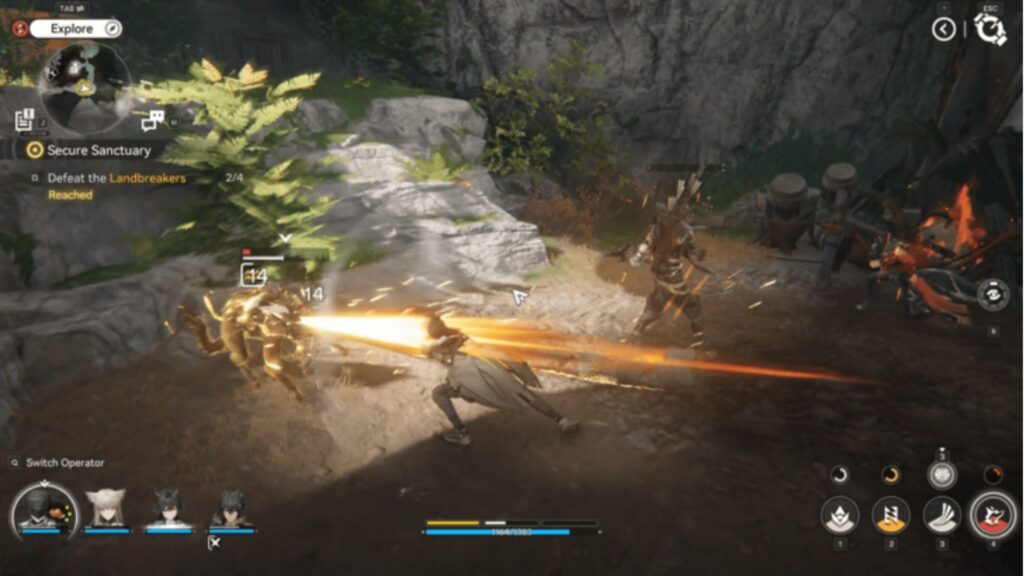
- Status Effects: You can apply two main types of status effects. Physical effects build up to four stacks of Vulnerable. Arts based effects build up to four stacks of Infliction, which can trigger bursts or reactions.
- Dodge: You can dodge twice in a row without interrupting attacks. A perfect dodge restores stamina and SP, which helps you stay aggressive during fights.
- AI & Assist: Your teammates now choose smarter actions and speak more often in combat. You can use Operator Tags, unlock special tutorials for high rarity units, and even check the teams used by other players.
- Presentation: Animations, camera angles, and combo transitions have all been refreshed. Bosses also have new Stagger Nodes that change how you break their defenses.
Controls Basics
- Mobile/PC: Tap/swipe for movement/attacks; hold for skills.
- Dodge: Double-tap direction.
- Switch weapons/operators mid-fight for combos.
Exploration & Story
Exploring Talos II feels more lively, especially inside Wuling.
- Wuling Exploration: You will use drones to spray areas and interact with a more reactive ecosystem. The region responds to your actions and changes as you progress.
- Exploration Tools: Buy Detectors and Compasses to locate hidden items. Your operators will also give hints while exploring, which makes it easier to find rewards.
- Story and Interactions: A new main chapter is included in this test. Cutscenes and 3D character gestures have been reworked for better storytelling.
- Extra Features: You can explore multi-layer maps, use tags for quick navigation, switch Endministrator forms, decorate Reception Rooms, and play around with updated camera tools that include filters and stickers.
Gacha (Headhunting) System
You can test the live-service pull mechanics:
- 80 pity for 6★ operator.
- 120 pulls guarantees featured 6★.
- Limited banners rotate; basics exclude them long-term.
As you experiment with pulls using beta resources to build teams around new operators, note the pity for launch planning.Enjoygm can be used here for top-ups for extra Headhunting when the game releases.
New Operators in Beta Test II
You can try 24 operators in this test. The main highlights come from the highest rarity reveals:
- 6★: Ardelia, Last Rite, Pogranichnik.
- 5★: Alesh, Snowshine (pre-reg reward).
- 4★: Estella, Fluorite, Antal, Akekuri, Catcher.
Focus tutorials on 5*/6★ for skill mastery.
Essential Player Tips
- Early Game: Prioritize Regional Development for rewards/unlocks. Use blueprints to ramp up AIC production fast.
- Combat: Stack Vulnerable/Infliction on bosses; Perfect Dodge chains for sustains. Test AI synergy in co-op Depot Nodes.
- Exploration: Equip Detectors in Wuling; place shared Ziplines for speed.
- Prep for Wipe: Screenshot builds/medals; Engrave stats on gear via new system.
Conclusion
So, that is it for the Arknights Endfield Final Beta Test II. So many new things and so many updates are soon to be delivered to your hands. We hope that our guide helps you to catch up with these new things so jump right into the power.