













Guidance
General region Excluding MY, SG, PH, ID, RU, UZ, IN, TL you can select the corresponding region for top-up in the group.
Due to in-game policy updates, top-up services are not available for accounts registered in the United States. The game account UID may change in the near future, please reconfirm before recharging.
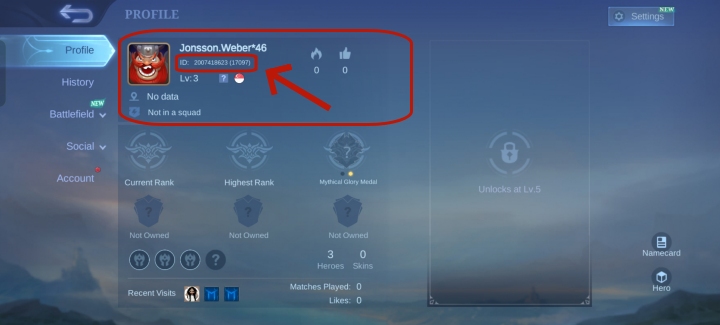
How to obtain your MLBB UID and Zone ID?
Refehe the below screenshots for your MLBB UID and Zone ID
1.Tap your profile icon in the top-left corner.
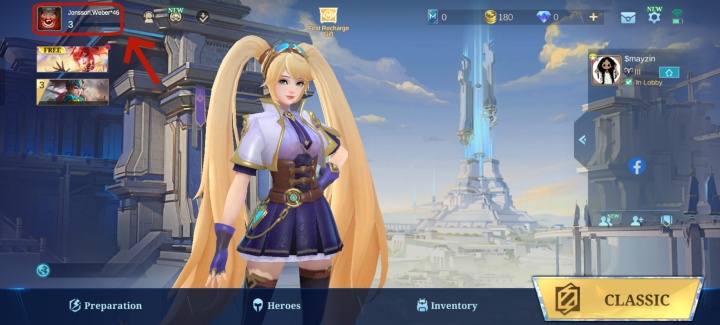
2.Your UID and Zone ID will be displayed (the Zone ID appears in brackets).
Weekly Diamond Pass Introduction:
Once you purchase a Weekly Diamond Pass, you will immediately get 100 Diamonds on the day of purchase. From a Weekly Diamond Pass, you can get maximum rewards of Diamond ×220, StarLight Point ×210, Weekly Diamond Pass Choice Bundle ×7, and Late Sign-in Card ×1. Meanwhile, your purchase will increase the progress of recharge event tasks by 100.
Weekly Diamond Pass Purchase Notice:
1.Your in-game account must be at least Lv.5 to unlock the purchase of the Weekly Diamond Pass.
2. A Weekly Diamond Pass will be active for 7 days. Daily rewards reset at 00:00 every day (server time). You can only have up to 10 Weekly Diamond Pass (not including subscription). You must wait 7 days to purchase another Pass if you have reached the purchase limit.You can purchase a maximum of 5 Diamond Weekly Cards at a time. If you need to purchase more than 5, please place separate orders.
3. If you have an active Weekly Diamond Pass subscription, you can still purchase the Weekly Diamond Pass, but the subscription will always apply first. Any Weekly Diamond Pass you purchase will activate only when your subscription ends.
4. The Weekly Diamond Passes you purchase via a 3rd Party platform are authorized by the MLBB official. All conditions regarding the Weekly Diamond Passes you purchase should abide by the rules stated in the game and you can also enjoy all bonuses concerning the Weekly Diamond Pass. Should you have any questions, please refer to the descriptions in the game.


wow in an instant
orderd one more. fast order
trustful